








Description
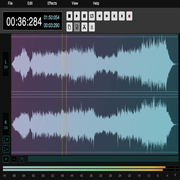
AudioMass is a free, web-based audio and waveform editor that runs in the browser. The project's live version is hosted at audiomass.co. The README says the editor now includes a multitrack mode, where you can layer several tracks, drag clips around, crossfade overlapping clips, record onto armed channels, and bounce the whole project down to a single file. You can run it locally by downloading the repository or cloning it, then starting a small web server. The README gives two ways to start the server, one using Go and one using a simple Python web server, and then you open localhost on port 5055. A command is also given for building the minified all.build.js file for publishing. The project is on GitHub, and the about page describes the features in more detail.…
Highlights
- Waveform and audio editing in the browser
- Multitrack mode with drag and crossfade
- Record onto armed channels
- Bounce a project to a single file
- Runs locally or at audiomass.co
Ratings & Reviews
No ratings yet
Be the first to rate AudioMass.
People also visit
AudioMass FAQ
What is AudioMass?
A free, full-featured audio and waveform editor that runs in the browser.
Can I use it without installing?
Yes. It is live at audiomass.co, according to the README.
What is new in multitrack mode?
You can layer multiple tracks, drag clips, crossfade overlaps, record onto armed channels, and bounce everything to one file.
How do I run it locally?
Clone or download the repository, start a web server in the code folder, and open localhost on port 5055. The README gives both a Go and a Python option.
Where is the project?
On GitHub, where the repository's about page describes the features.
What are the best AudioMass alternatives?
Popular alternatives to AudioMass include Ffmpeg-webCLI, MasterSelects and Audapolis. See all AudioMass alternatives