















Description
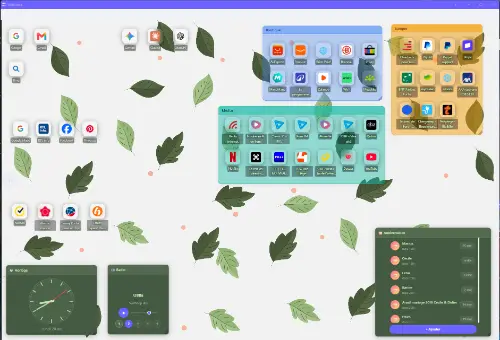
Bloom is a desktop shell for Windows that changes how the screen looks and behaves. It hides the Windows taskbar and adds a dock along the bottom in the style of macOS, a spring-animated notch at the top of the screen, and overlays for volume and brightness when you adjust them. Its site describes it as lightweight and says it uses under 10MB of memory while idle. The app is at version 3.10.2 and is downloaded as an installer from the site or from its GitHub releases page. The web page on the site is a browser simulation of the Bloom desktop, with glassmorphic panels, widgets and a bottom dock, so you can look at the layout before you install anything. The project aims to replace the rigid look of the standard Windows interface with a workspace that feels fluid and responsive, and it is developed as an independent project on GitHub.…
Highlights
- Hides the Windows taskbar
- Spring-animated notch at the top of the screen
- macOS-style dock along the bottom
- Volume and brightness overlays
- Under 10MB of idle memory, according to the site
Ratings & Reviews
No ratings yet
Be the first to rate Bloom.
People also visit
WebBoard
Turn your bookmarks into visual desktops you can share — no ads, free plan
Bloom FAQ
What is Bloom?
Bloom is a desktop shell for Windows. It replaces the usual taskbar with a dock and a top notch, and adds on-screen overlays for volume and brightness.
How do I install it?
Download the installer from the site, or from the GitHub releases page for version 3.10.2, and run it on your Windows PC.
Does it run on macOS or Linux?
The site describes Bloom as a Windows desktop shell. The page does not mention macOS or Linux builds.
How much memory does it use?
The site says Bloom uses under 10MB of memory while idle.
Is the web page the real app?
No. The page simulates the Bloom desktop in the browser so you can see the design. You need to install the Windows app to use it on your PC.
What are the best Bloom alternatives?
Popular alternatives to Bloom include Rainmeter, Freeter and NotchMomo. See all Bloom alternatives