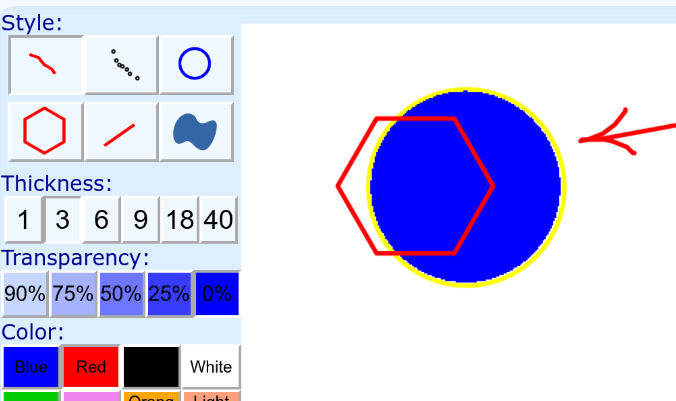















Description
Drawing is a simple online sheet for sketching geometry, from the geometry section of Math is Fun. You draw whatever you want on the page, and it works as an electronic whiteboard for figures and diagrams. To adjust the most recent addition, use the up, down, left and right arrow keys to nudge it, and hold the Ctrl key to make smaller adjustments. The page links to three related drawing tools: Symmetry Artist, Tessellation Artist and Spiral Artist, which are for symmetric designs, tessellations and spirals. A link returns you to the Geometry Index, where the rest of the site's geometry lessons are listed. Use the sheet to try out a shape while you read a lesson, or to sketch a figure before you work through a problem on paper.…
Highlights
- Freehand sketching as an electronic whiteboard
- Arrow keys nudge the latest addition
- Ctrl for finer adjustments
- Links to Symmetry, Tessellation and Spiral Artist
Ratings & Reviews
No ratings yet
Be the first to rate Geometry sheet by MathIsFun.
People also visit
Geometry sheet by MathIsFun FAQ
What is the geometry drawing sheet?
An online drawing page where you sketch figures freely, useful as an electronic whiteboard for geometry.
How do I move a shape I just drew?
Use the up, down, left and right arrow keys to nudge the most recent addition.
How do I make smaller adjustments?
Hold the Ctrl key while using the arrow keys to make finer changes.
What other tools are linked from it?
Symmetry Artist, Tessellation Artist and Spiral Artist, plus the Geometry Index of lessons.
What are the best Geometry sheet by MathIsFun alternatives?
Popular alternatives to Geometry sheet by MathIsFun include EduViz, Math4fun and Mathtutor On Groq. See all Geometry sheet by MathIsFun alternatives