

















Description
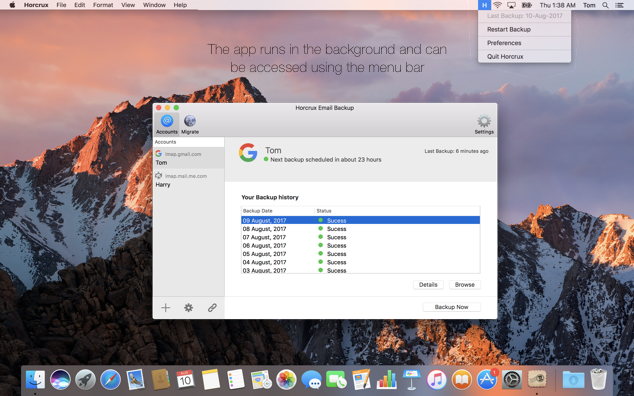
Horcrux is an email backup app for Mac OS X. It connects to your mail over IMAP and keeps a local copy of your emails on your Mac, so you can restore or migrate them after a server outage, an accidental deletion or an account lock-out. The site says it works with Gmail, iCloud, Outlook and Exchange through the universal IMAP protocol. You can add several accounts and set how often each one is backed up. Once installed, the app runs quietly in the background. The site says it is designed to work entirely on your local Mac and that no data leaves your computer. All emails are stored in a location you choose, including an external hard drive or a NAS. The site offers a free 30-day trial and a paid purchase, along with help articles, a forum and a support contact. Privacy and terms pages are published on the site.…
Highlights
- Local IMAP email backup on your Mac
- Works with Gmail, iCloud, Outlook and Exchange
- Backs up several accounts on a schedule you set
- Backups stored on a drive or NAS you choose
Ratings & Reviews
No ratings yet
Be the first to rate Horcrux.
People also visit
Horcrux FAQ
What is Horcrux?
An IMAP email backup app for Mac OS X that copies your emails to your computer.
Where are the backups stored?
Locally, in a folder you choose, which can be an external hard drive or a NAS. The FAQ says no data is sent out of your computer.
Which email providers work?
The site names Gmail, iCloud, Outlook and Exchange, using the IMAP protocol.
Is there a trial?
Yes, a free 30-day trial. Purchase options are on the Buy page.
Can I restore or migrate my emails?
Yes. The site says the backups are meant for restoring or migrating email after an outage, an accidental deletion or a lost account.
What are the best Horcrux alternatives?
Popular alternatives to Horcrux include Webmail App: IMAP Email Client, Airmail and Mimestream. See all Horcrux alternatives