














Description
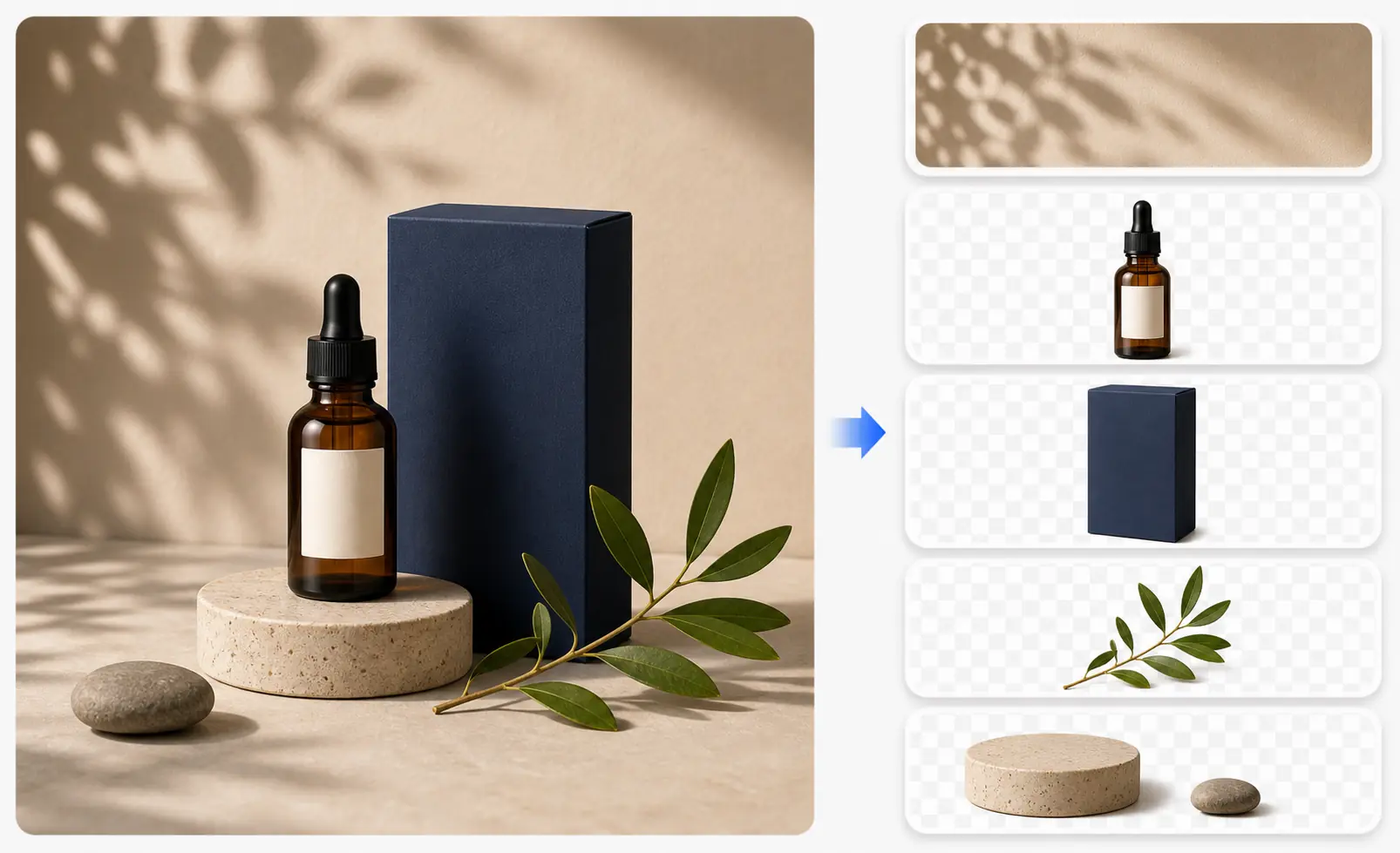
Image2Layer is built for designers, marketers, ecommerce teams, and creators who need to reuse or edit finished images without the original source file. It turns flat JPG, PNG, and WebP images into editable layered assets, helping users separate subjects, backgrounds, text, logos, shadows, and other visual elements.…
Preview
Highlights
- Exports editable PSD layers
- Separates text, objects, and backgrounds
- Downloads PNG layers and ZIP assets
People also visit
Apps people often open alongside Image2Layer.
Image2Layer FAQ
What is Image2Layer?
Image2Layer is built for designers, marketers, ecommerce teams, and creators who need to reuse or edit finished images without the original source file. It turns flat JPG, PNG, and WebP images into editable layered assets, helping users separate subjects, backgrounds, text, logos, shadows, and other visual elements.
Do I need to download Image2Layer?
No. Image2Layer runs in your browser at image2layer.com, so there's nothing to install.
What can you do with Image2Layer?
Main features: Exports editable PSD layers, Separates text, objects, and backgrounds, Downloads PNG layers and ZIP assets.
What are the best Image2Layer alternatives?
Popular alternatives to Image2Layer include NVIDIA Canvas, ABSURD.website and Repaint. See all Image2Layer alternatives