





Description
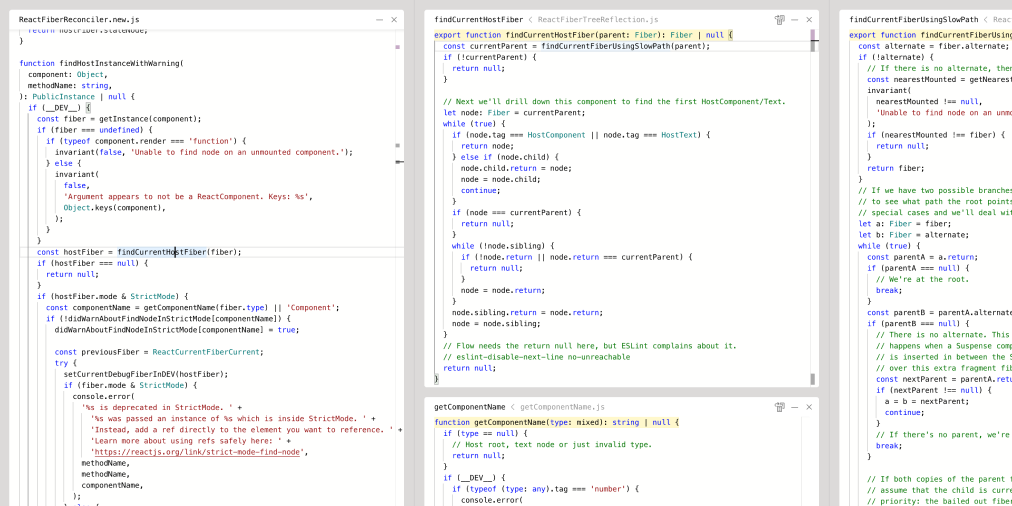
Code Explorer is an experimental web tool for reading and understanding source code, built by Paul Shen as an exploration of how space and semantics can help people follow code. The demo, labeled version 02, shows part of React's reconciler source, which is linked to the React repository. Cmd-click on a function jumps to its definition, and the definition opens in a pane to the right that shows only the selected function. Breadcrumbs in the header let you expand the context around it. Panes can be collapsed and dragged around, cmd-K opens a global symbol search, and a button in the header finds references to the current entity. The page asks visitors to use a viewport of 800 pixels or wider. It shows a last-deploy timestamp, and the author shares updates on X.…
Highlights
- Cmd-click to jump to a definition
- Pane shows only the selected function
- Collapsible, draggable panes
- Cmd-K global symbol search
- Find references to the current entity
Ratings & Reviews
No ratings yet
Be the first to rate code explorer.
People also visit
code explorer FAQ
What is Code Explorer?
An experimental tool for reading and understanding source code, shown with part of React's reconciler code from the React repository.
How do I navigate the code?
Cmd-click a symbol to jump to its definition. Cmd-K opens the global symbol search, and the header has a find-references button.
Does it need a particular screen size?
The page asks for a viewport of 800 pixels or wider.
Can I rearrange the panes?
Yes. Panes can be collapsed and dragged around, and header breadcrumbs let you expand the function's context.
Who made it?
Paul Shen, who shares updates on X under @_paulshen.
What are the best code explorer alternatives?
Popular alternatives to code explorer include Code Inspector, Codequery and Event Loop Explorer. See all code explorer alternatives