









Description
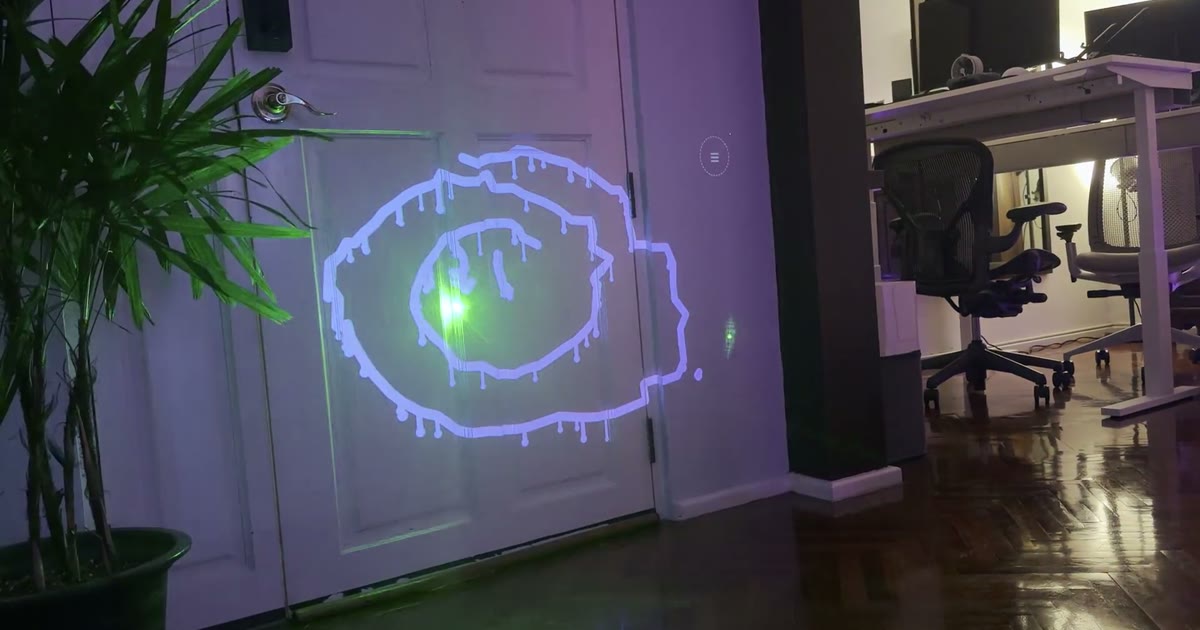
Laser Graffiti is a browser app that turns a webcam, a projector and a laser pointer into a drawing surface. You point the projector and the webcam at a wall, and the camera finds the dot of a laser pointer as you draw, while the projector paints the stroke right where you pointed. Before drawing you calibrate the setup by flashing markers into the corners of the projection, and the app then learns the brightness and colour of your laser. Once it runs, you can choose from six brushes, including round, marker, calligraphy, neon, spray and rainbow, and enable modes such as wet ink that drips, a fade-out effect and kaleidoscope mirroring. A laser-operated menu opens when you hold the pointer in the corner, so you do not need to touch the laptop. Drawings can be spun in 3D, and you can save a snapshot with the photo and drawing or download them as files. The site also includes a demo you can try without a projector: your mouse or finger acts as the laser, and you can play tic-tac-toe against the computer on the same surface. Everything runs in the browser with no install, and the project has no dependencies and is released under the MIT licence. The author describes it as a from-scratch reimplementation of an older laser-tagging idea.…
Highlights
- Draw on a wall with a laser pointer and projector
- Six brushes including neon, spray and rainbow
- Calibration and tracking for shiny floors
- Laser-operated on-wall menu
- Runs in the browser, MIT licensed
Ratings & Reviews
No ratings yet
Be the first to rate Laser Graffiti.
People also visit

Paint Board
🎨 A powerful multi-end drawing board that brings together a lot of creative…
Laser Graffiti FAQ
What is Laser Graffiti?
It is a browser app that lets you draw on a wall by pointing a laser pointer at it, while a projector paints your strokes where you point.
What do I need to use it?
A laptop with Chrome, a webcam pointed at the area, and a projector connected as a second screen. The page also lists the setup steps.
Can I try it without a projector?
Yes. The site has a demo where your mouse or finger acts as the laser, and it includes a tic-tac-toe game against the computer.
Is it free?
Yes. It is open source under the MIT licence, and the code is on GitHub.
Does it need to be installed?
No. It runs in the browser, and the site says there is no install and no native app.
Can I save my drawings?
Yes. You can save a snapshot with the photo and drawing, or download them as files.
What are the best Laser Graffiti alternatives?
Popular alternatives to Laser Graffiti include Mopaint, Lazpaint and Liquid Shape Distortions. See all Laser Graffiti alternatives