









Description
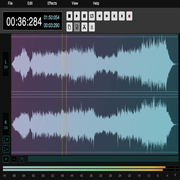
Supersaw is a digital audio workstation (DAW) that runs in the browser. The demo on the page shows a timeline with audio clips on tracks, here a bass drum pattern built from a TR-909 kick sample, with mute and solo controls for each track and a tempo display of 138 bpm. You switch between views with keyboard shortcuts, such as Shift plus a number. The timeline is one view, and the others are a MIDI editor, a playground, a Blofeld synth view, a blank instrument, a piano, a kick generator, a TB-303 bass view, a Tenori-On style grid, a TR-707 rhythm composer, an audio editor, a sampler, a tracker and a wavetable synth. The page is titled Supersaw v1.5, which suggests this is the version shown. It is aimed at people who make music on a computer and want to sequence and sound-design in a browser.…
Highlights
- Browser-based DAW with a timeline and clips
- MIDI editor, sampler and tracker views
- Synth and drum views such as TB-303 and TR-707
- Kick generator and wavetable synth
- Mute and solo controls per track
Ratings & Reviews
No ratings yet
Be the first to rate Supersaw.
People also visit
Supersaw FAQ
What is Supersaw?
A digital audio workstation you use in a web browser, for arranging clips, sequencing MIDI and making music.
Does it need an install?
The page is a web app and opens in a browser. The text does not describe an install step.
Which instrument views are included?
The navigation lists a Blofeld synth, a TB-303, a Tenori-On style grid, a TR-707 rhythm composer, a piano, a kick generator, a sampler, a tracker and a wavetable synth.
How do I switch between views?
Use Shift plus the number keys. The page lists Shift 1 for the timeline, Shift 2 for the MIDI editor and so on up to Shift 9.
What are the best Supersaw alternatives?
Popular alternatives to Supersaw include SuperSplat. See all Supersaw alternatives