Skip to content
Copy Text Easily

Free alternatives to Copy Text Easily

200 free apps like Copy Text Easily, closest match first.

Top picks

  1. T

    TextGO

    Launch

    TextGO is an open-source text tool for macOS and Windows that turns a text selection into an action. When you select text, a floating toolbar offers actions, and clicking one replaces the selected text with the result. Each action can have

    FreeOpen source

  2. C

    Cpdown

    Launch

    📥 cpdown - Copy to clipboard any webpage content/youtube subtitle as clean markdown with one click or shortcut

    FreeOpen source

  3. S

    SaneClip

    Launch

    SaneClip is a clipboard manager for the Mac. It keeps a history of what you copy so you can paste older items back, and the history can be locked with Touch ID and encrypted at rest with AES-256-GCM. Password manager entries are skipped, an

    Free

  4. P

    PasteIntoFile

    Launch

    Paste clipboard data into files and copy file contents directly via hotkey or context menu

    FreeOpen source

  5. H

    html-to-interaction-prompts

    Get

    This agent skill turns an HTML page, or a generated HTML reference, into an article of reusable interaction prompts. Each prompt describes one interaction, and the article puts a screenshot under each prompt title. The workflow starts by fi

    Free

  6. C

    clone-website

    Get

    Reverse-engineer and clone one or more websites in one shot — extracts assets, CSS, and content section-by-section and proactively dispatches parallel builder

    Free

More like Copy Text Easily

7
M

mini-browser

Browser automation skill for AI agents using the mb CLI

Get
8
C

CodeExpander Pro

Cross-platform text expansion tool that instantly inserts snippets, code…

Launch
9
A

AllInOneTools

Free simple tools for everyday tasks. No signup. No limits

Launch
10
S

Share Text Online Live

Share Text Online Live——Create, edit

Launch
11
F

firecrawl-instruct

Control and interact with a live browser session on any scraped page

Get
12
L

Lintalist

Searchable interactive texts to copy & paste text, run scripts

Launch
13
R

RealtimeClipboard

End-to-end encrypted clipboard sync between devices

Launch
14
B

browserbase/browser

Automate web browser interactions through natural language CLI commands

Get
15
S

scrape

Fetch clean markdown, HTML, JSON, or screenshots from one or more URLs

Get
16
W

Webclaw

The web scraper API your AI agent deserves

Launch
17
A

AI-MarkDone

ChatGPT directory navigation, Reader source copy, Dynamic Annotation, bookmarks

Launch
18
A

ArchiveBox

Create HTML & screenshot archives of sites from your bookmarks

Launch
19
P

PasteJustit.com

simple and efficient pastebin

Launch
20
A

AICrawlable

Free llms.txt generator for any website

Launch
21
Q

Qiaomu Anything To Notebooklm

Claude Skill: Multi-source content processor for NotebookLM

Launch
22
N

Notepin

Extremely simple blogging platform

Launch
23
W

WriteXO

Online Notepad with rich-text support, password protection and custom URLs

Launch
24
C

crawl

Crawl any website and save pages as local markdown files

Get
25
F

firecrawl-interact

Drive a live browser on a scraped page: click, fill forms, log in, paginate

Get
26
J

just-scrape

Web search, scraping, extraction, crawling, and monitoring

Get
27
D

defuddle

Extract clean article content from web pages or local HTML files

Get
28
L

Letterly

Voice Dictation, AI Note Taker & Meeting Transcription

Launch
29
A

agent-browser

Browser automation CLI for AI agents

Get
30
B

BLUF

Get the gist of web pages, gain deeper understanding of complex topics

Launch
31
A

Agent Fetch

Full-content web fetcher for AI agents

Launch
32
G

GenOffice

Free, open-source AI Office suite: Docs, Sheets, Slides, PDF

Launch
33
T

Textify

A small tool which allows to copy text from dialogs and controls

Launch
34
C

CondenseLab

Turn YouTube videos, PDFs

Launch
35
C

Clipboard History IO

The most secure way to effortlessly access, track

Launch
36
F

firecrawl-browser

Cloud browser automation for pages requiring clicks, forms, login

Get
37
Y

Yoopta-Editor

Build Notion-like, Craft-like, Coda-like, Medium-like editors with Yoopta

Launch
38
S

Spider

Foundational low latency web data collecting in Rust

Launch
39
S

scroll-scrubbed-word-reveal

Reveal marked-up text word by word as scroll progress advances

Get
40
T

Textweb

A text-grid web renderer for AI agents — see the web without screenshots

Launch
41
C

clone-website

Rebuild existing web pages as working local code, matching their real content

Get
42
S

Saga Reader

🏻 Blazing-Fast and Extremely-Lightweight Internet Reader driven by AI

Launch
43
F

firecrawl-crawl

Bulk-extract many pages from one site or section

Get
44
S

Save my Chatbot - AI Conversation Exporter

Download your ChatGPT, Claude

Launch
45
D

dpaste

Simple pastebin with multiple text and code option

Launch
46
P

Parchi

Your AI friend right in your browser

Launch
47
N

Notefox: websites notes

Take notes on every website in a smart and simple way!

Launch
48
S

Sitemap AI

Crawl websites and generate XML sitemaps, llms.txt & markdown

Launch
49
G

Gpt4V-scraper

AI agent that can SEE , control, navigate, & do stuff for you on your browser

Launch
50
S

SiteSnapper

Archive webpages with high-quality screenshots, metadata, and full text content

Launch

About Copy Text Easily

C

Copy Text Easily

Copy any text with one click—no selection needed

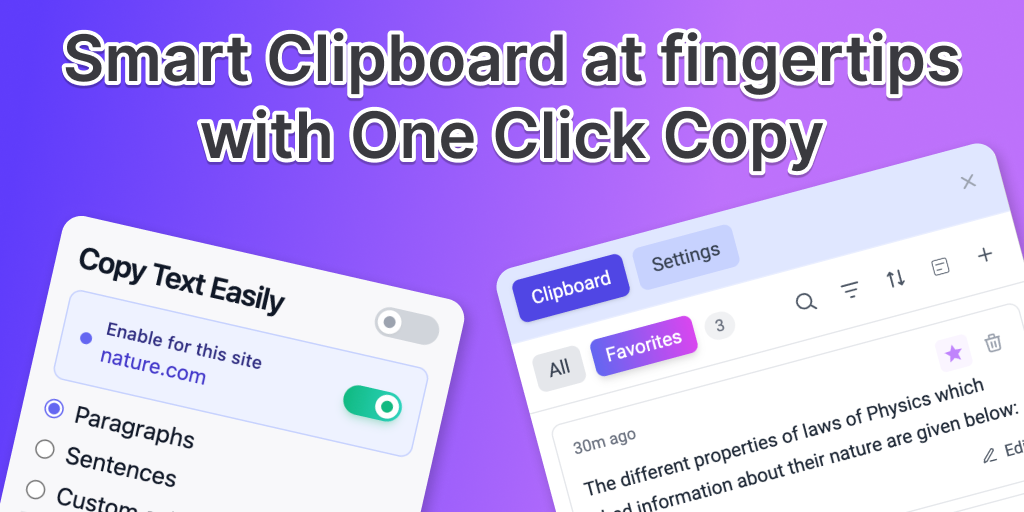
Copy Text Easily is a free browser extension for Chrome, Edge, Brave and Opera that copies text with one click. You hover over a paragraph, sentence or custom selection and click it, and the text is copied without highlighting or pressing Ctrl+C. Every copy is saved to a clipboard you can open on any page, so earlier snippets are not lost when you copy something new. Links and dropdowns can be copied without opening them: hover until the preview appears, then press Ctrl+C. The free version covers click-to-copy and the on-page clipboard. A one-time Pro upgrade adds site rules, regex, link copy and system-wide capture of Ctrl+C copies, with per-site controls. Copied text is processed and stored locally, and no account is needed. The extension starts turned off, so you switch it on in the popup and reload the page. It suits researchers, students and writers who collect passages from the web.

Price
Freemium
Category
Productivity
Website
devapt.com