Self-hosted alternatives to Horcrux
200 self-hosted apps like Horcrux, closest match first.
Top picks
- H

HermesSEG
LaunchA free, open-source secure email gateway and mail server you self-host: spam & malware filtering, encryption, and DKIM/DMARC in one Docker stack.
FreeOpen sourceSelf-hosted
- E

Eonvelope
LaunchE-nvelope is a self-hostable email archive that keeps your emails for as long as you want. It fetches mail continuously and automatically from IMAP, POP, Exchange and JMAP accounts, and it can import and export emails in several formats. Re
FreeOpen sourceSelf-hosted
- M

mail-archiver
LaunchMail-Archiver is a web application for archiving, searching and exporting email from several accounts. It can archive mail from IMAP accounts, from Microsoft 365 through the Graph API, from personal Microsoft accounts, and from import-only
FreeOpen sourceSelf-hosted
- M

Mailflow
LaunchMailFlow is a self-hosted, open-source webmail client that brings several email accounts into one browser interface. You connect Gmail through an app password over IMAP, iCloud Mail through an app-specific password, Outlook, Hotmail and Mic
FreeOpen sourceSelf-hosted
- R

Roundcube
LaunchRoundcube is free and open-source webmail software, written in PHP, which gives you a browser-based IMAP email client with an application-like interface. It provides the features you expect from an email client, including MIME and HTML mess
FreeOpen sourceSelf-hosted
- R

RustMailer
LaunchRustMailer is a self-hosted, open-source email API platform for syncing IMAP, sending SMTP, and integrating via webhooks. It supports multi-account sync, programmable filters with VRL, NATS delivery, gRPC & OpenAPI, plus a built-in web clie
FreeOpen sourceSelf-hosted
More like Horcrux























About Horcrux
Horcrux
Horcrux IMAP email backup for Mac OS X
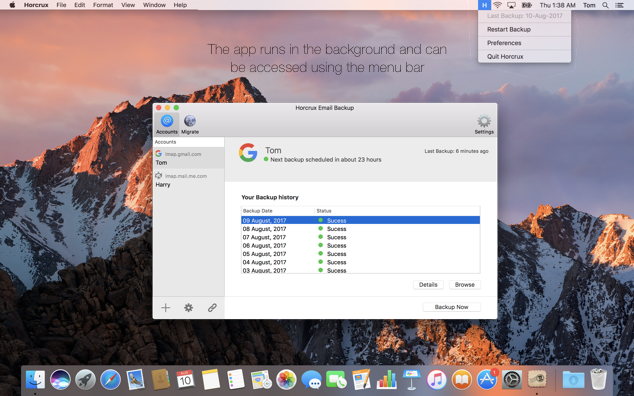
Horcrux is an email backup app for Mac OS X. It connects to your mail over IMAP and keeps a local copy of your emails on your Mac, so you can restore or migrate them after a server outage, an accidental deletion or an account lock-out. The site says it works with Gmail, iCloud, Outlook and Exchange through the universal IMAP protocol. You can add several accounts and set how often each one is backed up. Once installed, the app runs quietly in the background. The site says it is designed to work entirely on your local Mac and that no data leaves your computer. All emails are stored in a location you choose, including an external hard drive or a NAS. The site offers a free 30-day trial and a paid purchase, along with help articles, a forum and a support contact. Privacy and terms pages are published on the site.
- Price
- Free trial
- Category
- Productivity
- Website
- thehorcrux.com