Free alternatives to code explorer
200 free apps like code explorer, closest match first.
Top picks
- G

gitnexus-exploring
Getgitnexus-exploring is an agent skill for understanding unfamiliar code with GitNexus. It is for questions such as how a part of the code works, what the project structure is, where the database logic lives, and which components matter most.
Free
- C
Code Inspector
LaunchCode Inspector is a development tool that connects the page you are looking at with its source code. When you click a DOM element in the browser, it opens your IDE and places the cursor on the source code location of that element. The site
FreeOpen source
- C

caveman-explore
Getcaveman-explore is a read-only repository explorer from the caveman project, meant for cold-start orientation, broad cross-file localization, and cases where a direct search has failed. It is written as a fast, cheap explorer. Another agent
Free
- C
Codequery
LaunchA code-understanding, code-browsing or code-search tool. This is a tool to index, then query or search C, C++, Java, Python, Ruby, Go and Javascript source code. It builds upon the databases of cscope and ctags, and provides a nice GUI tool
FreeOpen source
- E

Event Loop Explorer
LaunchEvent Loop Explorer is a browser tool that shows how JavaScript runs, step by step. You write code in the built-in editor, press run, and watch each part update: the call stack, the Web API area, the console, the tasks queue, the microtasks
FreeOpen source
- C
Codeflow
LaunchCodeFlow is a browser tool that turns a GitHub repository into an interactive architecture map. You paste any GitHub URL, and it shows how the files connect, with dependencies, blast radius, code ownership, security issues and design patter
FreeOpen source
More like code explorer


understand-explain
A deep-dive explanation of a specific file, function, or module in the codebase


understand-dashboard
Launch the interactive web dashboard to visualize a codebase's knowledge graph

Excalith Start Page
Terminal-inspired, clean, feature-rich and customizable browser start page


SlidesCodeHighlighter
A little web app that helps you copy+paste syntax-highlighted code into slide



acquire-codebase-knowledge
The user explicitly asks to map, document, or onboard into an existing codebase

AI Code Context Helper
Desktop tool for extracting code context to enhance AI-assisted development




frontend-code-review
Use only when the user explicitly requests a review or audit of frontend code


About code explorer
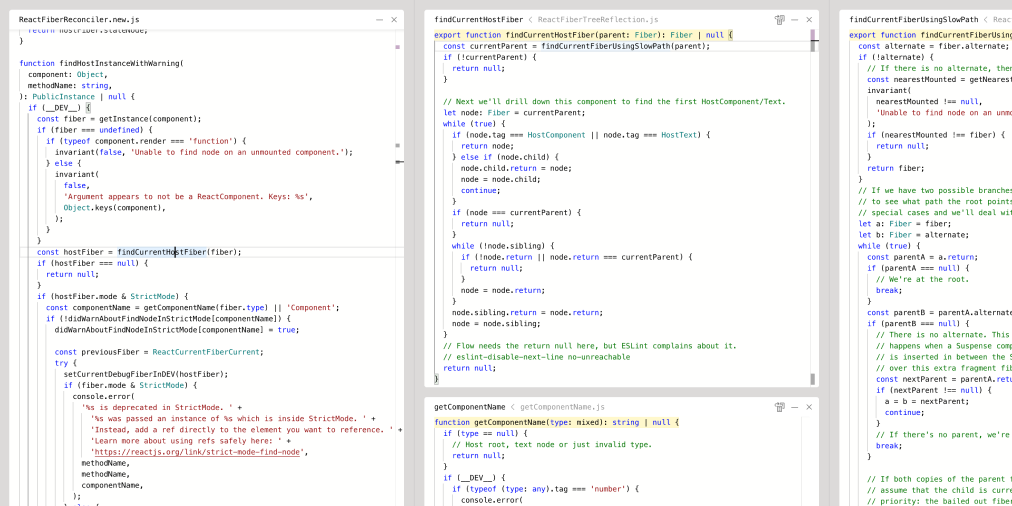
code explorer
An exploration in reading and understanding code
Code Explorer is an experimental web tool for reading and understanding source code, built by Paul Shen as an exploration of how space and semantics can help people follow code. The demo, labeled version 02, shows part of React's reconciler source, which is linked to the React repository. Cmd-click on a function jumps to its definition, and the definition opens in a pane to the right that shows only the selected function. Breadcrumbs in the header let you expand the context around it. Panes can be collapsed and dragged around, cmd-K opens a global symbol search, and a button in the header finds references to the current entity. The page asks visitors to use a viewport of 800 pixels or wider. It shows a last-deploy timestamp, and the author shares updates on X.
- Category
- Developer Tools
- Website
- bypaulshen.com