Skip to content
Drovp

Open source alternatives to Drovp

200 open source apps like Drovp, closest match first.

Top picks

  1. D

    droppy

    Launch

    droppy is a self-hosted file storage server with a web interface and capabilities to edit files and view media directly in the browser. It is particularly well-suited to be run on low-end hardware like the Raspberry Pi.

    FreeOpen sourceSelf-hosted

  2. I

    imgproxy

    Launch

    imgproxy is a fast and secure standalone server for resizing and converting remote images. The guiding principles behind imgproxy are security, speed, and simplicity

    FreeOpen sourceSelf-hosted

  3. U

    Uppy.io

    Launch

    Uppy is an open source JavaScript file uploader for web browsers. It pulls files from your disk, Dropbox or Google Drive, and it resumes uploads if the connection drops. It is modular, so you include only the parts you need, and it works wi

    FreeOpen source

  4. F

    Flyimg

    Launch

    Flyimg is a Dockerized application designed to resize, crop, and compress images on the fly. It allows you to build your own Cloudinary-like service with ease, ensuring optimized images for faster loading times and better performance.

    FreeOpen sourceSelf-hosted

  5. S

    SnapOtter

    Launch

    Suite of 200+ web tools for converting and editing images, videos, audio and PDFs, including a layer-based image editor, OCR, transcription, background removal and batch processing pipelines (alternative to SmallPDF, iLovePDF, CloudConvert)

    FreeOpen sourceSelf-hosted

  6. P

    PicList

    Launch

    PicList is an image upload and management tool based on PicGo. It uploads screenshots and files to storage you own, and it can compress images, add watermarks, rename files and copy links in the format your editor needs, such as Markdown, H

    FreeOpen source

More like Drovp

7
P

PrivyDrop

Simple and user-friendly, breakpoint-resumable peer-to-peer text, image

Launch
8
S

Shakepin

Drag and drop over apps open source alternative

Launch
9
D

DumbDrop

Stupidly simple file uploads

Launch
10
T

Transmute

File converter for images, video, audio, json, excel and more

Launch
11
P

Photoflare

Quick, simple but powerful Cross Platform image editor

Launch
12
P

Pairdrop Android

Android client for local file sharing

Launch
13
Q

Quickdrop

QuickDrop is an easy-to-use file sharing application

Launch
14
W

WebVideo2NAS

Self-hosted Chrome → NAS pipeline: capture HLS / DASH / MP4 streams

Launch
15
Z

ZenConverter

Local Android file converter built with Kotlin and Jetpack Compose

Launch
16
P

PolyUploader

Upload your files remotely to different hosts

Launch
17
C

copyparty

Portable file server with accelerated resumable uploads, deduplication, WebDAV

Launch
18
F

FotoKilof

GUI for ImageMagick and Wand or Pillow

Launch
19
F

Frame

Frame is a high-performance media conversion utility built on the Tauri v2

Launch
20
U

Uppy

A sleek, modular JavaScript file uploader that integrates seamlessly

Launch
21
D

Dropserver

An application platform for your personal web services

Launch
22
C

convt

Convert any file with a right-click

Launch
23
C

ConvertX

Online file converter which supports over a thousand different formats

Launch
24
P

PCLink

Cross-platform desktop app for secure remote PC control and management

Launch
25
C

Chibisafe

File uploader service that aims to to be easy to use and set up

Launch
26
B

Bitmappery

Browser based non-destructive image editor

Launch
27
C

copyparty

Portable file server with accelerated resumable uploads, deduplication, WebDAV

Launch
28
B

Bucketdrop

BucketDrop is a tiny, open-source menu bar app for uploading files

Launch
29
I

Imagor Studio

Self-hosted image gallery with layered editing

Launch
30
F

FFmpeg Commander

A web-based GUI for quickly generating common FFmpeg command-line operations

Launch
31
Z

Zipline

A ShareX/file upload server that is easy to use, packed

Launch
32
M

Mazanoke

A self-hosted local image optimizer that runs in your browser

Launch
33
C

Cloudreve

File management and sharing system, supports multiple storage providers

Launch
34
M

Menu Karan

Securely Create and Manage dekstop files manually

Launch
35
8

8mb.local

Browser-based video compressor

Launch
36
M

Moonvert

Convert files locally and conveniently on your Mac, not on the internet

Launch
37
W

WebDrop

Easiest group P2P File & Message transfer in browser with WebRTC

Launch
38
H

HandBrake Web

Use one or more instances of HandBrake video transcoder on a headless device

Launch
39
M

mikochi

Browse remote folders, upload files, delete, rename

Launch
40
F

FaynoSync

Self-hosted, open-source update server for desktop apps

Launch
41
N

Neodlp

Modern Video/Audio Downloader based on YT-DLP with Browser Integration

Launch
42
F

Ffmpeg-webCLI

A browser-based video editor powered by ffmpeg.wasm

Launch
43
E

Elodie

An EXIF-based photo assistant, organizer and workflow automation tool

Launch
44
O

Optimus

Image conversion and optimization desktop app

Launch
45
O

OpenYoink

A free, open-source macOS drag-and-drop shelf and Dynamic Island for files

Launch
46
Z

Zoomhub

Share and view high-resolution images effortlessly

Launch
47
R

Refloow-Photo-Studio

Powerful local photo editor built for quick, professional results

Launch
48
N

Node Snapdrop

Node.js version of the original Snapdrop

Launch
49
M

Media Preview Generator

Self-hosted previews, intro/credits detection and cross-server reuse for Plex

Launch
50
V

VERT

On-device file conversion utility

Launch

About Drovp
D

Drovp

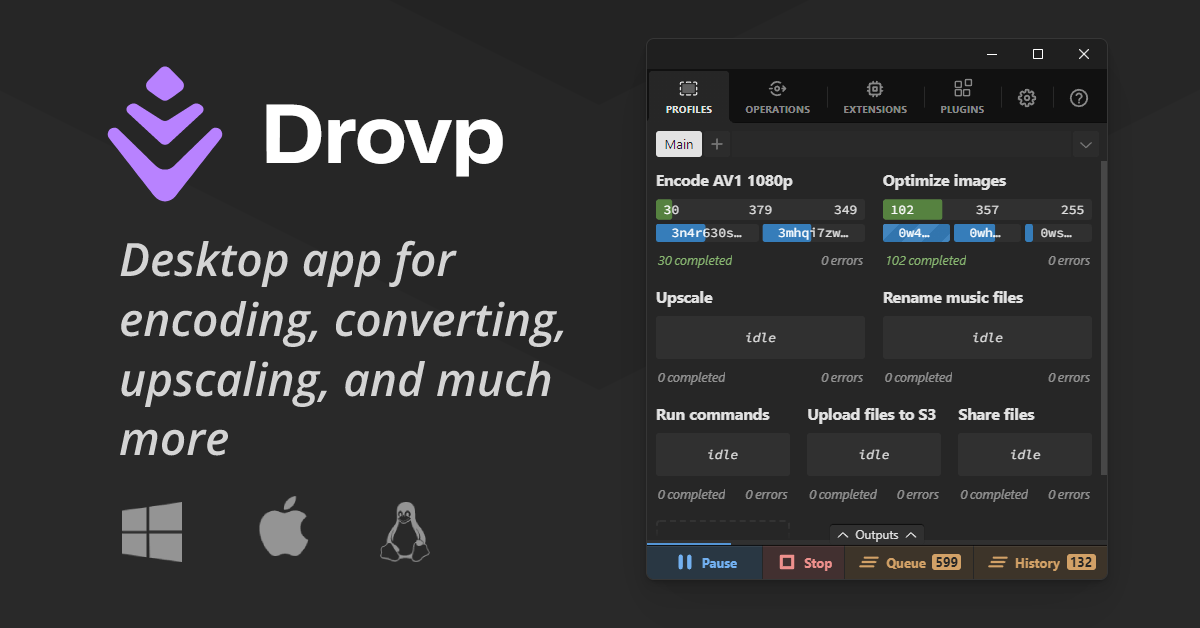
Desktop app for encoding, converting, upscaling, and much more

Drovp is a cross-platform desktop app for processing files with drop zones. You create a profile, which is a drop zone tied to a processor, configure how it should handle what you drop, and then drop files, folders, URLs, text or image data into it. Drovp itself does nothing on its own. It needs plugins that add processors for tasks such as encoding, converting and upscaling, and you install them from the registry in the app. Dropping a folder creates an operation for each file the plugin accepts, and queueing and parallelization controls are built in, including limits on how many operations of one processor run at the same time. Some processors offer their own interfaces for more detailed instructions. Holding Ctrl while dropping a file into an encode profile, for example, opens a media editor where you can crop, resize or cut. Profiles can be exported and shared with others, and imported again. Developers can write new plugins by enabling developer mode, registering the file extensions they handle and creating the processor. The site lists the app as beta, and the current version shown is 0.8.2. The encode processor is published on GitHub, and the project has an issues page and a discussions area for questions.

Category
Developer Tools
Website
drovp.app