Self-hosted alternatives to Drovp
200 self-hosted apps like Drovp, closest match first.
Top picks
- D

droppy
Launchdroppy is a self-hosted file storage server with a web interface and capabilities to edit files and view media directly in the browser. It is particularly well-suited to be run on low-end hardware like the Raspberry Pi.
FreeOpen sourceSelf-hosted
- I
imgproxy
Launchimgproxy is a fast and secure standalone server for resizing and converting remote images. The guiding principles behind imgproxy are security, speed, and simplicity
FreeOpen sourceSelf-hosted
- F

Flyimg
LaunchFlyimg is a Dockerized application designed to resize, crop, and compress images on the fly. It allows you to build your own Cloudinary-like service with ease, ensuring optimized images for faster loading times and better performance.
FreeOpen sourceSelf-hosted
- S

SnapOtter
LaunchSuite of 200+ web tools for converting and editing images, videos, audio and PDFs, including a layer-based image editor, OCR, transcription, background removal and batch processing pipelines (alternative to SmallPDF, iLovePDF, CloudConvert)
FreeOpen sourceSelf-hosted
- P
PrivyDrop
LaunchPrivyDrop is an open-source, free, and secure P2P file transfer tool with no size limits, no registration, and support for resumable transfers. Based on WebRTC for end-to-end encryption, its code is transparent and trustworthy. Share text,
FreeOpen sourceSelf-hosted
- D

DumbDrop
LaunchDumbDrop is a simple file upload application with a drag-and-drop interface. You open it in a browser, drop files onto the page, and they are saved into a folder on the server, which the README shows as ./uploads for the Docker quick start.
FreeOpen sourceSelf-hosted
More like Drovp









Media Preview Generator
Self-hosted previews, intro/credits detection and cross-server reuse for Plex



About Drovp
Drovp
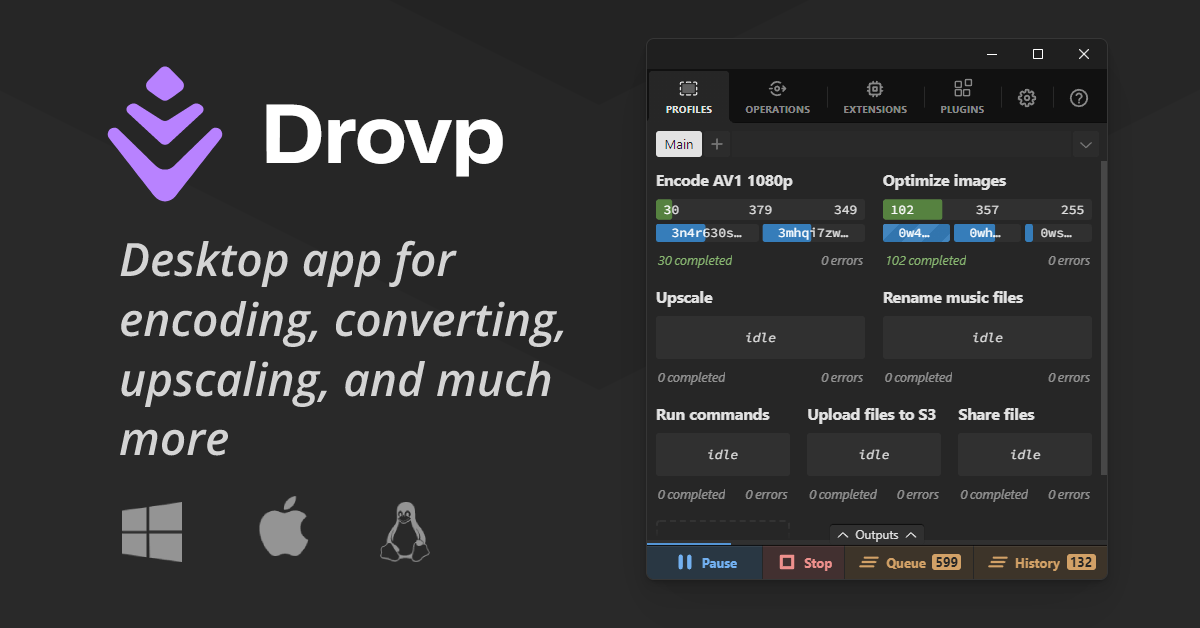
Desktop app for encoding, converting, upscaling, and much more
Drovp is a cross-platform desktop app for processing files with drop zones. You create a profile, which is a drop zone tied to a processor, configure how it should handle what you drop, and then drop files, folders, URLs, text or image data into it. Drovp itself does nothing on its own. It needs plugins that add processors for tasks such as encoding, converting and upscaling, and you install them from the registry in the app. Dropping a folder creates an operation for each file the plugin accepts, and queueing and parallelization controls are built in, including limits on how many operations of one processor run at the same time. Some processors offer their own interfaces for more detailed instructions. Holding Ctrl while dropping a file into an encode profile, for example, opens a media editor where you can crop, resize or cut. Profiles can be exported and shared with others, and imported again. Developers can write new plugins by enabling developer mode, registering the file extensions they handle and creating the processor. The site lists the app as beta, and the current version shown is 0.8.2. The encode processor is published on GitHub, and the project has an issues page and a discussions area for questions.
- Category
- Developer Tools
- Website
- drovp.app