Free alternatives to Laser Graffiti
200 free apps like Laser Graffiti, closest match first.
Top picks
- W

webgl-laser
GetCreate a fixed full-screen WebGL laser background effect with a thin white-hot vertical core, restrained brand-colored halo, and soft smoky fog around the
- M
Mopaint
Launch🎨🩸🔥🧞 Modern, modular painting program... (early stages)
- P

Painting Droid
LaunchPainting Droid is a web painting app inspired by MS Paint, with AI actions added to the familiar layout. It opens with a menu bar that has File, Edit, Layers and Adjustments menus, a color picker, a brush size control and a canvas that star
- P

Paint Board
LaunchPaint Board is an open-source drawing board that runs in the web browser, with a large set of brushes and effects. You can draw freehand with a pen, an outlined pen, a rainbow brush, pixel and multi-color brushes, ink, text and several othe
- L
Lazpaint
Launch🎨 Cross-platform image editor with raster and vector layers similar to Paint.Net written in Lazarus (Free Pascal)
- L

Liquid Shape Distortions
LaunchLiquid Shape Distortions is a browser tool that generates psychedelic animations with liquid motion, distortion, shadows and light. It runs in real time using WebGL shaders, starting from a random seed and mixing in noise patterns such as f

More like Laser Graffiti






About Laser Graffiti
Laser Graffiti
Draw on walls with a laser pointer
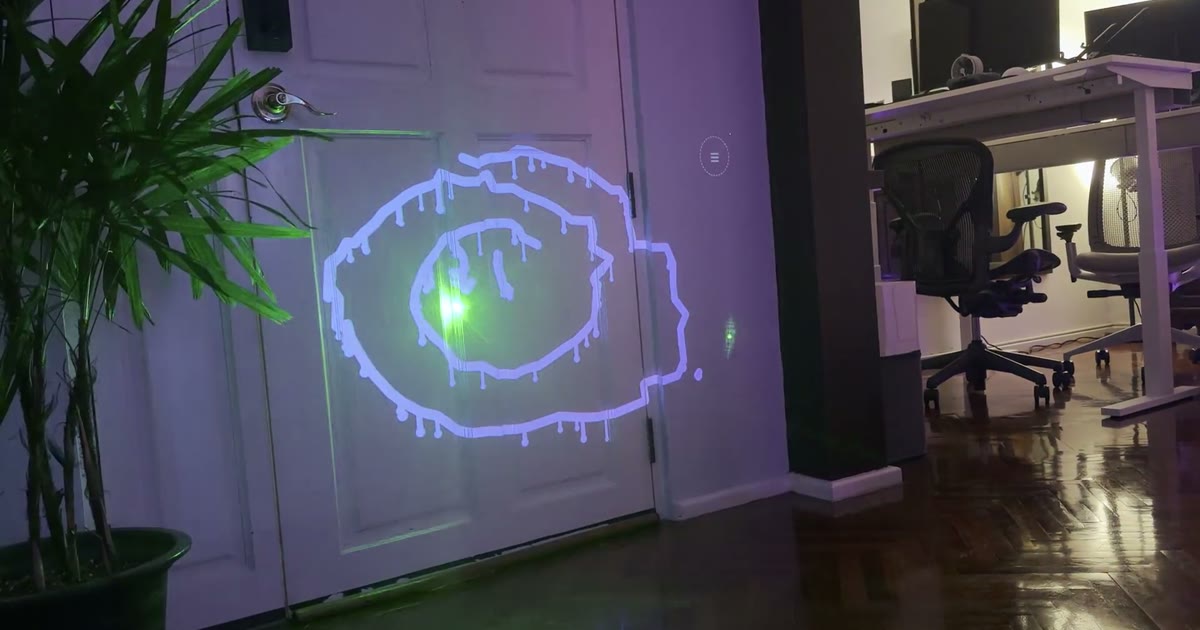
Laser Graffiti is a browser app that turns a webcam, a projector and a laser pointer into a drawing surface. You point the projector and the webcam at a wall, and the camera finds the dot of a laser pointer as you draw, while the projector paints the stroke right where you pointed. Before drawing you calibrate the setup by flashing markers into the corners of the projection, and the app then learns the brightness and colour of your laser. Once it runs, you can choose from six brushes, including round, marker, calligraphy, neon, spray and rainbow, and enable modes such as wet ink that drips, a fade-out effect and kaleidoscope mirroring. A laser-operated menu opens when you hold the pointer in the corner, so you do not need to touch the laptop. Drawings can be spun in 3D, and you can save a snapshot with the photo and drawing or download them as files. The site also includes a demo you can try without a projector: your mouse or finger acts as the laser, and you can play tic-tac-toe against the computer on the same surface. Everything runs in the browser with no install, and the project has no dependencies and is released under the MIT licence. The author describes it as a from-scratch reimplementation of an older laser-tagging idea.
- Price
- Open source
- Category
- Photo & Video
- Website
- consti.de